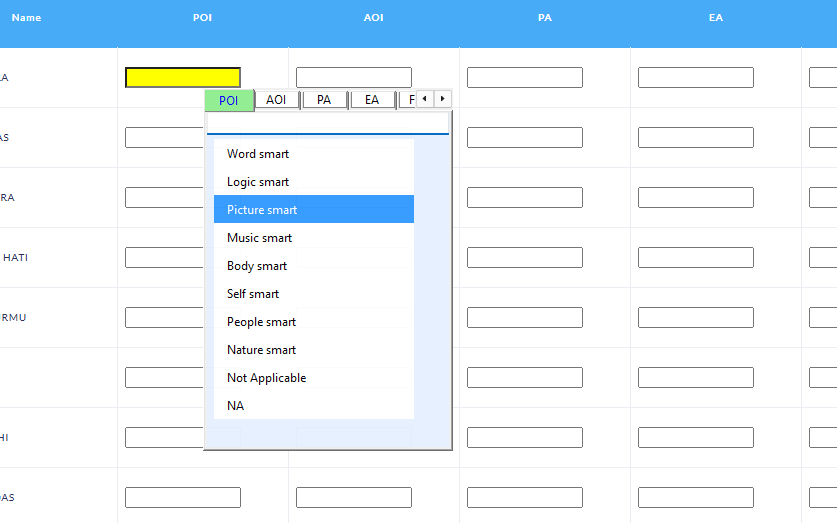
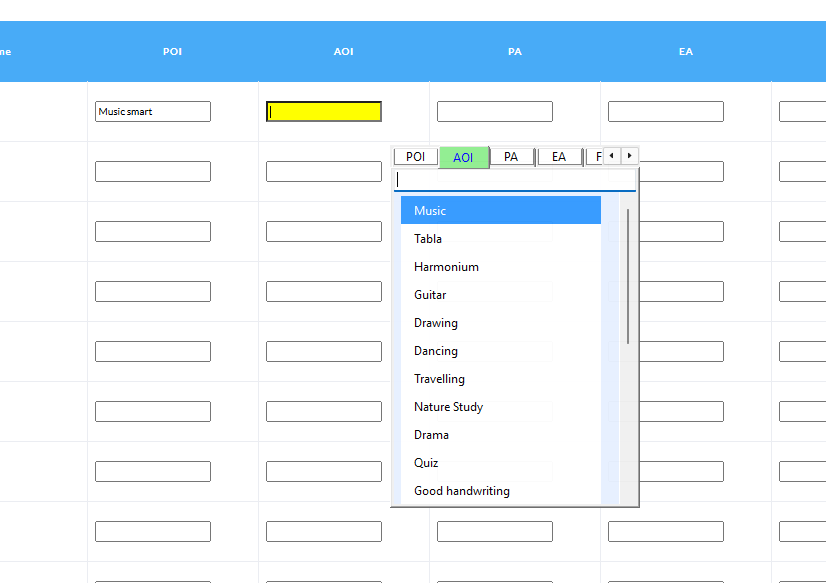
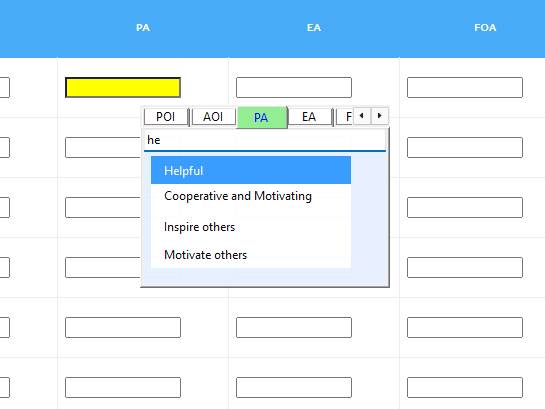
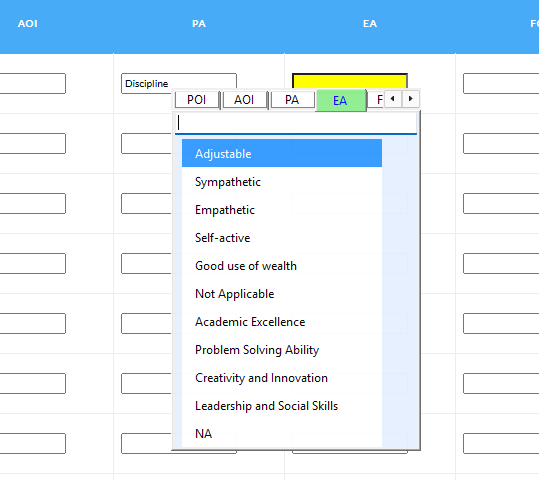
📸 Screenshots

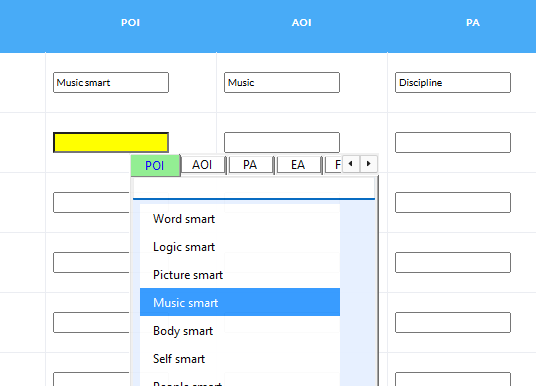
📘 Software Details
Product: Entry LPCD (Data Entry Tool)
Version: 1.2
Developer: Kanchan Sain (Shyama Database)
Released: 2026
OS Required: Windows 10 and above
Description:
Entry LPCD (Data Entry Tool) is a specialized software designed to simplify
and speed up the LPCD student data entry process for Bengali education
institutions. It provides smart field-based auto options, keyboard-friendly
navigation, and accurate data handling to ensure fast, error-free entry.
The tool works offline and is currently available without purchase under the applicable terms.
Declaration
- This software is entirely developed by Kanchan Sain.
- It is currently available as a free-to-use tool under the applicable terms.
Features
- Displays only relevant options based on selected field.
- Fast and accurate keyboard-based data entry.
- Improves work speed and reduces errors.
- Smart, fast and user-friendly interface.
Security Notice
- Download ONLY from the official website: https://shyamadatabase.in
- Other sources may contain malware, modified files, or data theft risks.
Disclaimer
- You are solely responsible for using this software.
- Shyama Database or Kanchan Sain is not responsible for any damage or data loss.
- Your local data security is your responsibility.
- No responsibility for any third-party software issues.
- This software is provided “AS-IS” with no warranty, guarantee, or service obligation.
Privacy Policy
- This software does not collect, store, track, or transmit any user information, student data, or personal data while the software is running.
- No student data or other information entered into the software is sent to any online server, cloud service, or third party.
- All data entered into the software remains 100% stored locally on the user's device under their full control.
- The developer does not receive, view, or have access to any data entered in the software.
- When downloading the software, users may voluntarily provide information such as their name, email address, school name, and mobile number through the download request form.
- This information is used only for software distribution, updates, support, and communication related to the software.
- Download form information is not sold, rented, or shared with third parties except where required by law.
- By submitting the download form, the user consents to the collection and use of this information for the purposes described above.
Government / Affiliation Notice
- This software is not affiliated with or officially approved by any government department.
- It is an independent utility tool created only for convenience and time-saving use.
Legal Limitation
- No legal claims, charges, or demands can be made against the software, developer, or Shyama Database.
- The user accepts full responsibility by downloading, installing, and using this software.
- This software is provided “AS-IS” without any warranty, guarantee, or service obligation.
- The developer shall not be held responsible for any limitation, deactivation, or discontinuation of features due to trial expiration, licensing terms, donation requirements, version changes, or system compatibility issues.
- Internet connectivity may be required for downloading updates, new versions, or any license or validation-related functionality, if applicable.
Terms & Updates
- Terms, conditions, and features may change at any time without prior notice.
- By continuing to use the software, the user agrees to the latest terms published on the official website.
- The developer does not guarantee future updates, fixes, improvements, or technical support.
- Older versions may stop working automatically after the release of a new version.
- Downloading new versions, updates, or any license or validation-related features may require an active internet connection.
- New versions may be free or paid at the developer’s discretion. Future versions may introduce optional donation-based or paid licensing models. Continued use will be subject to the terms in effect at that time.
Trial & Usage Status
- This current release operates in a continuous "Trial" status.
- There are no activation popups and no day limits (expiration dates) in this version.
- While this specific version does not expire, future updates or newer versions may introduce a valid license or donation requirement.
- If the user chooses not to use a new version, this older version may eventually no longer function or receive support.
- Compatibility with future system updates, government formats, or education platforms is not guaranteed.
📰 News & Updates
18 May 2026: Entry_LPCD_1.2.exe Released
- No installation required
- Very lightweight
- No .NET Framework required
14 Dec 2025: Entry_LPCD_1.1.msi
19 Nov 2025: New EntryLPCD Installer released. Windows 7 support added with better and smarter UI improvements.
Video tutorial updated with latest instructions.
14 Dec 2025: Entry LPCD v1.1 released.
17 Nov 2025: Entry LPCD v1.0.0 released.
Download only from official site.
🎥 How To Use
📘 User Guide
🔹 Step 1: Turn ON the LPCD Helper
• Open the Entry LPCD software.
• Click the Entry LPCD OFF button.
• A message will appear: "LPCD Helper is now ON."
🔹 Step 2: Open the Student LPCD Entry Page
• Open the Student LPCD Entry page in your browser or software.
🔹 Step 3: Open the LPCD Popup Window
• When you need to select an LPCD indicator, press the F4 key.
• The LPCD Popup Window will appear.
🔹 Step 4: Select an Option
• Use the Up and Down Arrow keys to move through the options.
• Press Enter to select the highlighted option.
🔹 Step 5: Verify the Selected Indicator
• The current LPCD tab indicator will be updated automatically.
• Repeat the same process whenever you need to change the indicator.
💡 Pro Tips
• Use Up and Down Arrow keys to select an option quickly.
• Use Left and Right Arrow keys to change the tab indicator manually.
• Press Esc to hide the Popup Window.
⚠️ Legal Disclaimer:
I, Kanchan Sain, and Shyama Database disclaim all liability for any errors, data loss, misuse, or damages arising from the use of this software.
By using this tool, the user accepts full responsibility and agrees that the software is provided “as is”, without any guarantees or warranties.
