Entry LPCD v1.1 (New)
Auto-Suggest Keyboard Entry App for LPCD Work
Important Information
This page was originally created before the Google Play Store release of Entry LPCD.
Since then, the application, features, policies, terms, declarations, and compliance information have been updated and expanded.
Please review the latest:
The latest published policies, disclosures, and service information shall take precedence over any outdated information that may appear in earlier versions.
📖 Read Current Information📘 About the App
Entry LPCD is a specialized Android keyboard and entry assistant designed to make LPCD entry significantly faster, smarter, and easier. It offers automatic suggestions, guided fields, offline support, and a smooth workflow for accurate and efficient input.
Now includes:
- 🔹 Tab-to-Entry for faster navigation
- 🔹 Offline Data Storage for use without internet
- 🔹 Online Tab-to-Entry support for connected workflow
- 🔹 Special Keyboard for Formative Entry
- 🔹 Custom LPCD Student Remarks creator
Perfect for:
- School LPCD entry
- Fast form filling
- Error-free guide-based typing
- Mobile-friendly data entry
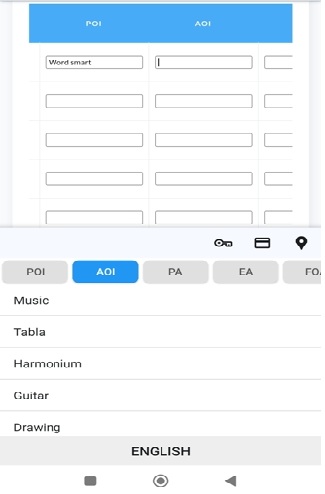
📸 Screenshots
✨ Features
- Auto-suggested typing for LPCD fields
- Keyboard-based quick entry
- Smart correction & guidance
- Simple interface – no training needed
- Fully offline – no internet required
- Lightweight & fast performance
🔐 Privacy & Data Usage
This application uses Google Firebase Authentication for login. After a successful login, certain account and device information is securely stored on our server for verification and security purposes. All collected information is securely encrypted before storage. We use Google Firebase, a secure cloud service provided by Google, to store this data.
📌 Data We Collect (Encrypted)
- Basic account details (Name & Email from Google Login)
- Login information (Login Method & Timestamp)
- Device information (Device ID, Device Model, Android Version)
Every piece of information listed above is stored in a fully encrypted format to protect your identity and privacy.
📌 Why This Data Is Collected
- To verify genuine users
- To prevent misuse across multiple devices
- To enhance app security and performance
- To provide user support and account identification
📌 What We Never Collect
- No LPCD entry or student data
- No keyboard-typed content
- No contact list, photos, location, or files
📌 Data Sharing
We do not share any data with advertisers, external companies, or third parties. All encrypted data is used strictly for internal authentication and security purposes only.
📌 Security Measures
- Full encryption of all stored data
- Secure HTTPS/TLS communication
- Restricted Firebase database access
📌 Data Retention
Your data remains stored as long as your account is active or until you request deletion.
📌 User Rights
- You may request deletion of your data at any time
- You may request a copy of your stored information
- You may stop using the app at any time
📌 Contact
For support, privacy-related concerns, or account deletion requests, please contact:
✉️ shyama.database@outlook.com
📞 +91 8900133366
By using this application, you agree to the secure encrypted handling of your account and device information as described above.
⚠️ Declaration
Entry LPCD is developed and maintained by Kanchan Sain (Shyama Database). This application is intended solely as a manual typing assistance tool to help make LPCD entry faster and easier. It does not automate, manipulate, integrate with, or directly interact with any government platform or system. All typing and actions are performed manually by the user.
Entry LPCD and Shyama Database are independent and not affiliated with, endorsed by, or officially connected to any government department, school authority, education board, or institutional system.
Distribution & Updates
- Entry LPCD is officially available via the Google Play Store (Public Testing).
- Users are strongly advised to install the app only from the Google Play Store for safety and verified updates.
- Installing modified, unofficial, or third-party APKs may be unsafe and is strongly discouraged.
- This is the first public release, and some unexpected behavior or software limitations may occur.
- Updates, improvements, and new features may be released, but continuous updates or long-term service availability are not guaranteed.
- The developer reserves full rights to update, restrict, modify, disable, or discontinue the application or associated services at any time, without notice.
Data & Privacy
- The app does not collect LPCD form input, student data, marks, or keyboard-typed content of any kind.
- Only limited encrypted authentication details and device information are stored for verification, licensing control, and security purposes.
- Google Firebase Authentication is used strictly for secure login and identity validation.
Liability
- The developer is not liable for any data loss, device malfunction, typing errors, financial consequences, or issues caused by unofficial APKs, unsupported usage, or improper installation.
- All information entered using this application is fully controlled and submitted by the user.
- The developer is not responsible for incorrect values, typing mistakes, wrong marks, or any outcome resulting from user-entered data.
- No claim, complaint, or compensation shall be accepted for incorrect entries or usage results.
Disclaimer
This software is provided on an “as-is” and “as-available” basis, without any warranties—express or implied—related to performance, compatibility, availability, accuracy, or fitness for any specific purpose. Use of this application is entirely at the user’s own discretion and risk. The developer does not guarantee uninterrupted operation or permanent availability of features or services.
By downloading, installing, or using this application, you confirm that you have read, understood, and agree to all terms and conditions stated above.
🔒 Security Tips
Smartphones are used for banking, payments, and many other sensitive tasks. To keep your device and personal information safe, please follow these important security guidelines:
- Never download apps from unknown or third-party websites. Unofficial APKs may contain harmful code that can steal your data.
- Always install apps from trusted sources like the Google Play Store or the official developer website. This ensures the app is safe and verified.
- Avoid installing “MOD” or modified versions of any app. Normal users cannot understand what hidden activities or dangerous permissions a MOD app may contain.
- Before installing any app, check the permissions it asks for. If an app requests unnecessary permissions (like camera, contacts, or location without reason), avoid installing it.
- Keep your device updated with the latest security updates to protect against malware and hacking attempts.
- Use antivirus or built-in device protection to scan apps and files regularly.
- Only download Entry LPCD from the Google Play Store. Other sources may provide modified or unsafe versions of the app. Other sources may provide modified or unsafe versions of the app. Only download Entry LPCD from the Google Play Store.
Following these tips will help keep your smartphone, your data, and your personal information safe.
📞 Consultation Service
If you need help with Android or Windows–related issues, you can book a short consultation session over the phone. This service is provided personally by Kanchan Sain (Shyama Database).
- Duration: Up to 10 minutes
- Consultation Fee: ₹111 (non-refundable)
- Mode: Telephonic conversation
- Requirements: Advance booking is mandatory
- Refund Policy: Consultation charges are non-refundable under any circumstances
- Topics Covered: Android app issues, Windows errors, technical guidance, installation support, and basic troubleshooting.
After booking, you will receive a scheduled time for the consultation call. Please ensure your phone is available and reachable at the given time.
⚠️ Only technical guidance is provided — no guaranteed fix or remote access support.
⚙️ How to Install
- Open the Google Play Store.
- Search for Entry LPCD.
- Tap Install.
- After installation, go to Settings → Keyboard & Input.
- Select Entry LPCD Keyboard as the default keyboard.
⚠ Installation and use of this application are entirely at the user's own risk and responsibility.
🎥 How to Use
Watch the full tutorial on YouTube: